Event Description Examples: Ready-to-Use Templates for Organizers
Event Description Examples: Ready-to-Use Templates for Organizers

The most effective event descriptions sell the experience first, then answer the 5 W’s, and close with a single clear call to action. That formula works across every format: concert listings, email blasts, landing pages, and social posts. The one-line pattern is: Hook → What to expect → Logistics → CTA. A quick sample: “Dance under the stars at Austin’s favorite summer block party — live jazz, food trucks, and craft beer every Friday in July. Free entry before 7 PM. Grab your spot at [link].” Short descriptions (25–50 words) work for listings and social; longer ones (100–250 words) suit landing pages and email. Either way, include the organizer name, performer names, and venue in the copy for SEO and accessibility.
Key Takeaways
A strong event description leads with a hook, answers the 5 W’s, names the organizer and performers for SEO, and closes with one specific CTA adapted to the channel’s length limit.
| Point | Details |
|---|---|
| Lead with the hook | Open with the most interesting detail — headliner, outcome, or unique fact — before any logistics. |
| Answer the 5 W’s | Who, what, when, where, and why should all appear in the first paragraph of any description. |
| Name everyone for SEO | Include organizer, performer, and venue names every time; this builds long-term search discovery. |
| Match length to channel | Full pages work best at 100–250 words; short listing fields need the hook and CTA within ~600 characters. |
| Eventhound for local reach | Listing on Eventhound puts your optimized description in front of local audiences via AI-driven recommendations. |
Table of Contents
- What are event descriptions and why do they matter?
- What must every event description include?
- How do you write a great event description step by step?
- Event description examples and ready-to-use templates
- How should you adapt the same description for different channels?
- Editor’s checklist and five copy-ready short templates
- Common mistakes that hurt conversions and how to fix them
- The copy-first approach is the only one that scales
- Get your event in front of local audiences with Eventhound
- Sources
What are event descriptions and why do they matter?
An event description is the compact marketing copy that tells potential attendees what will happen, who it’s for, and why they should show up. It’s not a press release and it’s not a calendar entry. Think of it as a short sales pitch that doubles as a search-engine asset.
Three things ride on getting it right. First, ticket conversion: a vague or feature-heavy description gives readers no reason to click “buy.” Leading with a hook, describing what to expect, covering practical details, and finishing with a clear CTA is the structure that consistently moves people from curious to registered. Second, discoverability: search engines and AI recommendation tools surface events based on the text in the description. Including the organizer name, performer names, and venue name builds long-term SEO equity and helps fans find events through artist or venue searches. Third, accessibility and expectation-setting: a well-written description tells attendees what to wear, whether the venue is wheelchair accessible, and what the format looks like, reducing no-shows and support emails.
Some platforms cap the description field at 600 characters, and the same copy often auto-populates into confirmation emails, registration forms, and landing pages. Write it clean the first time, and you’re covered across every touchpoint. You can always update it after the event goes live.
What must every event description include?
Think of these as the seven load-bearing pieces. Miss one and the description starts to leak.
- Hook/opening line. One sentence that makes the reader stop scrolling. Lead with a sensory detail, a bold promise, or a surprising fact. “The rooftop opens at sunset and the bar tab is on us until 8 PM” beats “Join us for our annual networking event.”
- What to expect. One or two sentences on the experience, framed as benefits rather than features. Not “We’ll have three speakers” but “You’ll leave with a repeatable cold-outreach system from three founders who’ve each closed seven-figure deals.”
- Who it’s for. Name the audience explicitly: beginners, seasoned collectors, families with kids under 12, local restaurant owners. This filters in the right people and filters out the wrong ones.
- Logistics. Date, start and end time, full address, ticket price or free entry, parking notes, and any accessibility information. For screen-reader friendliness, write accessibility notes as plain text rather than icons: “Venue is wheelchair accessible. ASL interpretation available upon request.”
- Why attend / unique selling point. The headline benefit, the headliner, the exclusive outcome. One sentence. Make it specific.
- Clear CTA. Tell people exactly what to do: “Register at [link],” “Tickets available at the door,” or “RSVP by Friday, March 14.” Add urgency when it’s real: limited seats, early-bird pricing ending soon.
- SEO signals. Weave in the organizer name, performer or speaker names, venue name, and event type (jazz festival, coding bootcamp, pop-up market). Including the 5 W’s up front lets both readers and search engines decide relevance in seconds.
How do you write a great event description step by step?
A five-step workflow keeps the process fast and the output consistent, whether you’re writing your tenth listing this month or your first.
-
Define the goal and primary audience. Are you selling tickets, building a waitlist, or recruiting volunteers? The goal shapes every word. A paid concert description needs urgency and social proof. A free community workshop needs clarity and reassurance. Write the goal at the top of your draft before you write a single line of copy.
-
Choose your voice and tone. Match the event’s personality. A formal gala calls for measured, professional language: “Join [Organization] for an evening of curated art and conversation.” A neighborhood food festival wants something warmer: “Bring the whole crew — 40 local vendors, live music, and zero dress code.” A tech webinar can go direct and benefit-led: “In 60 minutes, you’ll know exactly which AI tools cut your reporting time in half.” Tailoring the description to the audience and using persuasive action verbs like enjoy, experience, and learn consistently outperforms generic copy.
-
Write the hook first. Don’t warm up. Open with the most interesting thing about the event. For a concert: “Indie rock trio The Midnight plays their only East Coast date of the year.” For a workshop: “Most small business owners overpay taxes by $3,000 a year. This workshop fixes that.” For a community event: “Free kayak lessons for kids 8–14, no experience needed.”
-
Build the body: experience, then logistics. One or two sentences on what attendees will see, do, or walk away with. Then the practical details: date, time, location, price, and any accessibility notes. On short-format channels, cut to logistics only after the hook. On landing pages, you have room for a speaker bio, a program outline, and a testimonial.
-
Edit for clarity and channel limits. Read the description aloud. If you stumble, the sentence is too long. Cut jargon. Replace passive constructions with active verbs. Check that exactly one CTA appears. Full event pages work best at 100–250 words; anything longer risks burying the key details. Confirm the organizer name, performer names, and venue appear at least once each.
Editing checklist before you publish:
- Hook in the first sentence
- 5 W’s answered (who, what, when, where, why)
- Single, specific CTA
- Organizer and performer/speaker names present
- Accessibility note included (plain text, not icons)
- SEO keywords woven in naturally
- Links tested and working
Event description examples and ready-to-use templates
The examples below follow the hook → benefits → practical details → CTA structure used by organizers who consistently fill seats. Each tier is labeled so you can grab the length that fits your channel.
Short templates (25–50 words) for listings and social
These are plug-and-play. Swap the bracketed fields for your details.
- Concert: “[Artist Name] brings their [Tour Name] to [Venue], [City] on [Date]. Doors at [Time]. Tickets from $[Price] — limited floor spots available. Get yours at [link].”
- Workshop: “Learn [skill] in one afternoon with [Instructor Name] at [Location]. [Date], [Time]. Seats capped at 20. Register at [link].”
- Webinar: “[Speaker Name] breaks down [Topic] in 45 minutes. Free. [Date] at [Time] ET. Save your seat: [link].”
- Festival: “[Festival Name] returns to [Park/Venue] on [Date] with 30+ vendors, live music, and free admission. Bring the family. Details at [link].”
- Pop-up market: “[Market Name] pops up at [Address] on [Date], [Time]–[Time]. Local makers, food trucks, and free entry. [link]”
Medium templates (75–150 words) for email and event pages
Using short paragraphs and bullet points for lineups or need-to-know items keeps medium-length descriptions readable on mobile.
Concert (medium): [Artist Name] plays [Venue Name] in [City] on [Date] — their first local show since [Year]. The setlist pulls from all three albums, with a full band and a special guest opening set from [Opener Name].
Doors: [Time] | Show: [Time] | All ages welcome Tickets: $[Price] general / $[Price] VIP (includes early entry and a signed poster) [Venue] is wheelchair accessible. Parking available on [Street Name]. Grab tickets before Friday — the last two shows sold out in 48 hours. [Buy now at link]
Workshop (medium): [Workshop Name] with [Instructor Name] gives [audience] a hands-on [X]-hour session covering [Topic 1], [Topic 2], and [Topic 3]. You’ll leave with a [deliverable: template/plan/framework] you can use the same week.

Date: [Date] | Time: [Time]–[Time] | Location: [Address] Cost: $[Price] | Seats: [#] remaining Venue is step-free. Contact [email] to request accommodations. [Register at link]
Long template (200–300 words) for landing pages and press
This format suits festivals, multi-day conferences, and ticketed galas. Template libraries that break copy into modular fields — lead sentence, details, why attend, and bio — make long descriptions faster to assemble.
Festival (long): [Festival Name] returns to [Venue/Park], [City] for its [Nth] annual celebration of [theme: food, music, art, etc.] on [Date(s)].
This year’s lineup features [Headliner 1], [Headliner 2], and [Headliner 3] across three stages, plus [#] local food vendors, a juried art market, and family activities from noon to close. [Sponsor or partner name] is presenting the main stage.
What to expect:
- [Stage/Area 1]: [brief description]
- [Stage/Area 2]: [brief description]
- Kids’ zone: free activities for ages [range], open [hours]
Practical details: [Date(s)] | Gates open [Time] | [Venue Name], [Full Address] Tickets: $[Price] single day / $[Price] weekend pass | Kids under [age] free [Venue] is ADA accessible. Accessible parking available at [entrance/lot]. ASL interpretation at the main stage on [Day].
[Festival Name] is produced by [Organizer Name] in partnership with [Partner]. Questions? Email [contact] or visit [website].
[Buy tickets / Get your pass at link]
How should you adapt the same description for different channels?
The core copy stays the same. What changes is the order and the length. Short platform fields and email snippets should prioritize the hook and the CTA; logistics belong in the confirmation email and landing page where space allows.
Here’s a quick rewrite of the same event across three formats:
Long listing (full page): “Indie rock trio The Midnight plays their only East Coast date of the year at The Fillmore Philadelphia on Saturday, April 19. The show draws from all four studio albums, with support from Wye Oak. Doors at 7 PM, show at 8 PM. Tickets from $35 general / $75 VIP. The Fillmore is wheelchair accessible; accessible parking on Spring Garden Street. Buy tickets at [link] — floor is nearly sold out.”
75-word email blurb: "The Midnight hits The Fillmore Philadelphia on April 19, their only East Coast stop this tour. Full band, four-album setlist, Wye Oak opening. Doors at 7 PM. Tickets from $35, floor nearly gone. [Grab yours before they’re gone → link]"
35-character social headline: “The Midnight @ Fillmore Philly — Apr 19”
| Channel | Character/word limit | Priority 1 | Priority 2 | Priority 3 |
|---|---|---|---|---|
| Event listing (short field) | ~600 characters | Hook | Organizer/artist name | CTA |
| Email blurb | 75–100 words | Hook + date | Logistics | CTA |
| Social post (organic) | 25–50 words | Hook | Date/location | Link |
| Landing page | 100–250 words | Hook | Full experience + lineup | CTA + accessibility |
| Press release | 200–300 words | Headline + 5 W’s | Program/speakers | Organizer quote + CTA |
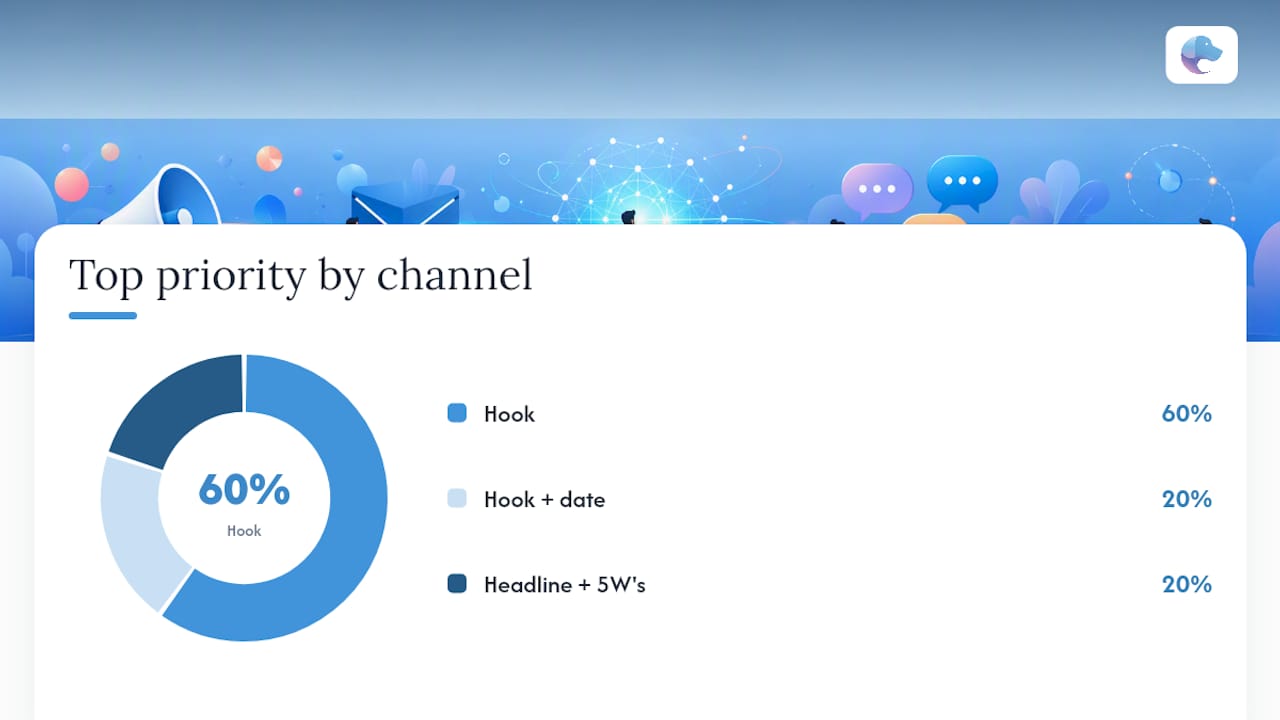
Pro Tip: On listing sites that truncate after the first two lines, front-load the artist or speaker name and the date. A reader who sees only “The Midnight — April 19 — Fillmore Philadelphia” has enough to click through.
Editor’s checklist and five copy-ready short templates
Run this checklist before every publish. It takes 90 seconds and catches the mistakes that cost tickets.
- [ ] Hook in sentence one
- [ ] Who, what, when, where, and why answered
- [ ] Organizer name and performer/speaker names present
- [ ] Single, specific CTA with a working link
- [ ] Accessibility note in plain text
- [ ] SEO keywords (event type, venue, city) woven in naturally
- [ ] Links tested
- [ ] Description updated if lineup or details changed after first publish
Five short templates, ready to paste:
- Concert: “[Artist] at [Venue], [City] — [Date]. Doors [Time]. Tickets from $[Price]. [Link]”
- Workshop: “[Skill] workshop with [Instructor], [Date] at [Location]. [# seats] left. Register: [Link]”
- Webinar: “Free 45-min session: [Topic] with [Speaker]. [Date], [Time] ET. Save your seat: [Link]”
- Family event: “Free family fun at [Location] on [Date]: games, food, and live music. All ages. [Link]”
- Pop-up market: “[Market Name] at [Address], [Date] [Time]–[Time]. Local vendors + food trucks. Free entry. [Link]”
Pro Tip: A/B test your CTA phrasing on two versions of the same listing: “Register now” vs. “Save your seat” vs. “Get tickets.” Small wording changes often move conversion more than longer rewrites, and most listing platforms let you update copy after publishing.
Common mistakes that hurt conversions and how to fix them
Most weak event descriptions share the same handful of problems.
Burying the hook. Opening with the organization’s history or a generic welcome sentence loses readers in the first five words. Lead with the most interesting information in the first paragraph — the headliner, the outcome, the thing that makes this event different from the 40 others on the same weekend.
Missing or vague CTA. “For more information, visit our website” is not a call to action. Tell people exactly where to click and what happens when they do. “Buy tickets at [link] — early-bird pricing ends Sunday” is a CTA.
Ignoring performer and organizer names. Skipping these isn’t just an SEO miss. Fans search by artist name; community members search by organization. Including organizer, performer, and venue names consistently builds discovery equity over time.
No accessibility note. Leaving out wheelchair access, parking, or interpretation availability forces attendees to email you. Write it once in plain text and you eliminate a friction point for a meaningful portion of your audience.
Overloading with hype. Words like “epic,” “unmissable,” and “one-of-a-kind” appear in so many descriptions that they’ve lost all meaning. Specifics do the work hype can’t. “The only outdoor jazz festival in Baltimore with free admission” beats “an unmissable musical experience.”
Pro Tip: When tickets are 80% sold, update the description to say so: “Only 40 tickets remain.” Updating the description after the event is live is standard practice and takes 30 seconds. Scarcity language at that stage converts faster than any rewrite.
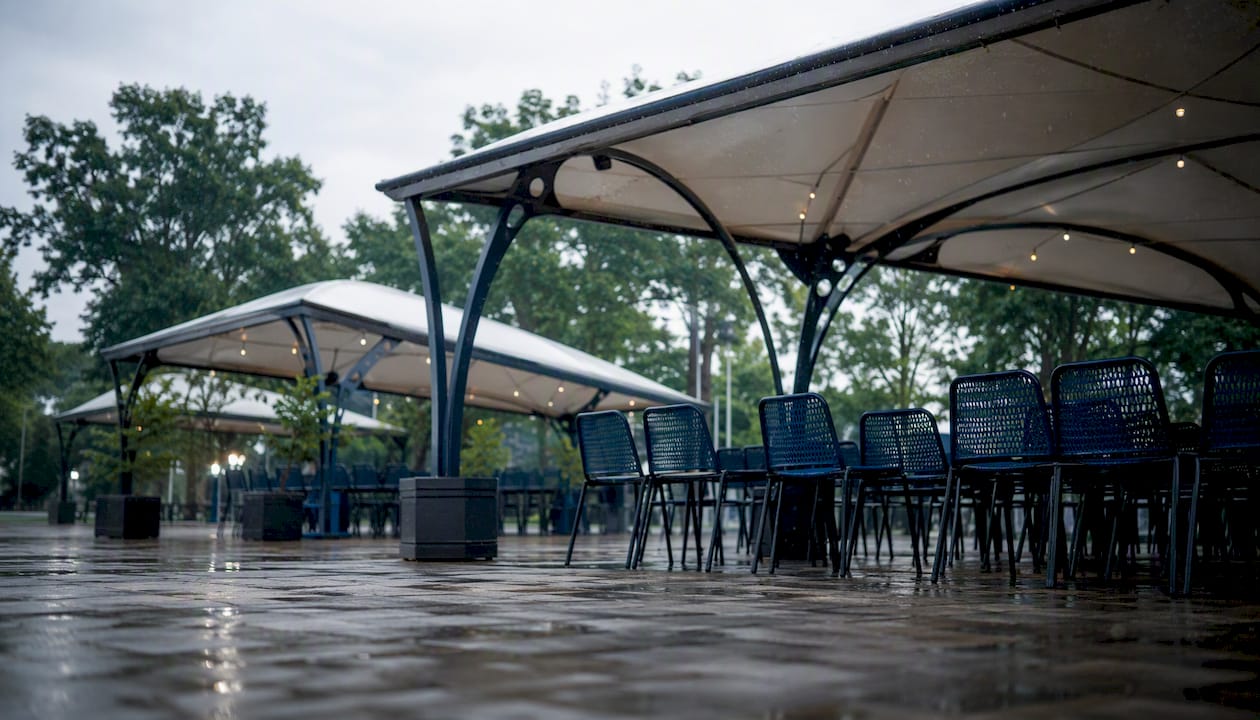
Pro Tip: For outdoor events, add one sentence on your wet-weather plan. “Event proceeds rain or shine; covered areas available” prevents a wave of “is it still on?” messages the morning of.
The copy-first approach is the only one that scales
Most organizers write the event description last, after the graphic is done and the social posts are scheduled. That’s backwards. The description is the source document. Every other asset, the email subject line, the Instagram caption, the paid ad headline, should pull from it.
The template-first method works for organizers with limited time because it forces the right decisions early: who is this for, what’s the one thing they’ll get out of it, and what do I want them to do right now. Once those three questions are answered in the description, every downstream channel becomes a trim-and-adapt job rather than a blank-page problem.
One thing most guides skip: the organizer name matters as much as the event name for long-term discovery. A reader who attends one great show by [Organizer] will search that name next time. If the name never appears in the description, that search goes nowhere. Name yourself, name your performers, name your venue. Every time.
Run at least one A/B test per event, even a small one. Swap the CTA phrasing or add the performer name to the subject line. The data you collect from 200 registrations tells you more than any template guide, including this one.
Get your event in front of local audiences with Eventhound
Writing a great description is step one. Getting it in front of the right people is step two. Eventhound is an AI-powered local discovery platform built for exactly that: connecting event organizers with local audiences actively looking for things to do nearby.
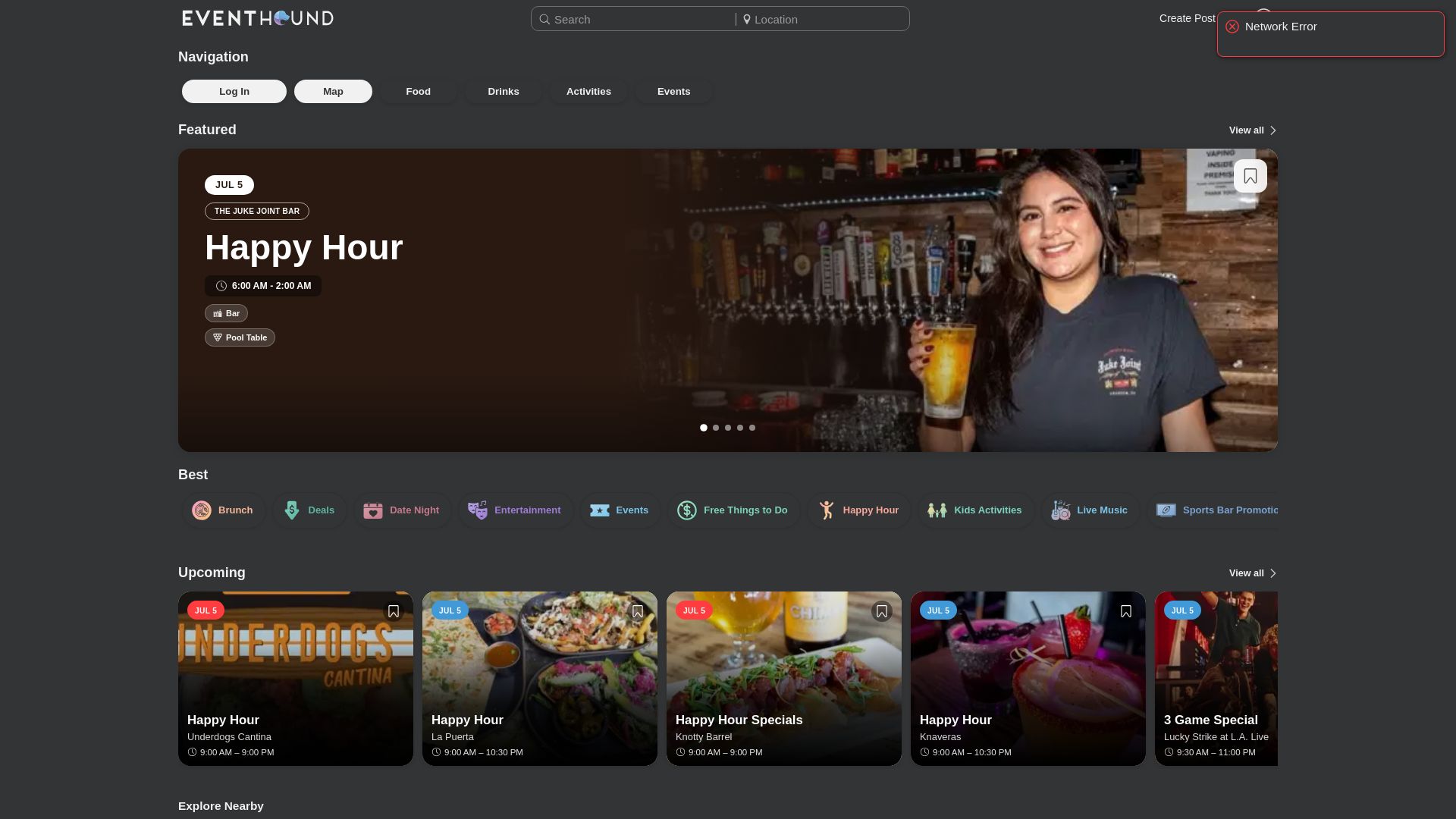
When you list on Eventhound, your event description feeds directly into AI-driven recommendations matched to users by location, interest, and availability. That means your optimized copy, with the performer names, venue, and CTA you just wrote, reaches people who are already in discovery mode rather than waiting to be found. Eventhound surfaces concerts, festivals, workshops, pop-up markets, family events, and community gatherings alongside restaurant specials and happy hours, so your listing appears in a high-intent local context.
See how listing works on Eventhound and get your next event in front of the local audience it deserves.
Sources
These are the primary references used throughout this article. Consult platform-specific guides for character limits and the copywriting resources for creative examples.
- Best-practices-for-writing-the-event-description?lang=en_US
- Write an Event Listing That Sells | Copywriting Guide
- Is Your Event Listing Costing You Ticket Sales? Find Out With Our Free Event Listing Grader
- Mastering compelling event description writing
- How to Create a Compelling Event Description - AddEvent
- How to write a great event description - National Science Week
- Examples for Event Description Template