Community Calendar Submission: A Quick Checklist for Organizers
Community Calendar Submission: A Quick Checklist for Organizers

You get a community event listed by confirming it meets the calendar’s eligibility rules, prepping the required fields and assets, and running it through the calendar’s Add Event form. From there, most calendars review your listing in a matter of days, not weeks.
Before you touch a submission form, gather this:
- Event title (clear, no ALL CAPS, no internal jargon)
- Date and start/end time, with the correct time zone
- Venue name and full address (or a virtual event link)
- Organizer name and contact — email or phone
- Ticket or registration URL, plus price or “free”
- One image, sized right, with alt text ready to paste in
Have those six things in hand and you can knock out a community calendar submission in one sitting, on almost any municipal or public-media site. The rest of this guide walks through exactly how, and where the process tends to trip people up.
Key Takeaways
Getting a community event listed reliably comes down to matching eligibility rules, filling every required field correctly, and submitting early enough to survive an editorial review.
| Point | Details |
|---|---|
| Confirm eligibility first | Check that your event is public, nonprofit, or community-focused and falls inside the calendar’s coverage area. |
| Prepare every field in advance | Have your title, date/time, venue, contact, registration link, and price ready before opening the form. |
| Use a square image with real alt text | A 1000×1000 pixel image and a plain, literal alt-text description both speed up approval. |
| Submit 2 to 3 weeks ahead | This lead time covers typical 2–3 business day reviews and leaves room for edit requests. |
| Extend reach beyond one calendar | List on Eventhound alongside official calendars so AI-driven matching puts your event in front of nearby, interested people. |
Table of Contents
- Who Can Submit to a Local Community Calendar?
- What Fields and Assets Do You Need Before You Submit?
- How Do You Actually Submit an Event to a Calendar?
- What Happens After You Submit Your Event?
- Why Do Calendar Submissions Get Rejected?
- When Should You Submit, and What About Recurring Events?
- Should You List on Discovery Platforms Too?
- What’s the One Change That Improves Your Odds Most?
- How Eventhound Extends Your Event’s Reach
- Frequently Asked Questions
- Sources
Who Can Submit to a Local Community Calendar?
Most local community calendars exist to serve the public, not to sell for anyone. That single distinction decides more accept/reject calls than any other rule on the books.
Calendars run by cities, libraries, schools, and public broadcasters generally welcome events that are open to the general public or clearly benefit the community. Think festivals, markets, art walks, blood drives, volunteer days, story times, town halls (the informational kind, not the campaign kind), and free classes. Texas Public Radio’s community calendar, for instance, is explicit that it exists for nonprofit and community-focused programming, and accepts both virtual and in-person listings under that umbrella.
Eligibility usually breaks down into a few recognizable buckets:
- Public and civic events — city meetings open for public comment, civic celebrations, voting information sessions
- Nonprofit and volunteer events — fundraisers, food drives, cleanup days
- Arts, culture, and education — gallery openings, workshops, author talks, school performances
- Family and recreation — story hours, park programs, youth sports registration
- Markets and local commerce — farmers markets, craft fairs, small-business open houses (as long as the event itself isn’t purely a sales pitch)
Geography matters more than people expect. A city-run calendar, like Sacramento’s, is built around events happening in or around that city, and a regional arts calendar like Bellows Falls Downtown states plainly that submissions need to be open to the general public or regionally relevant. Submit a Sacramento restaurant’s happy hour to a calendar built for Vermont’s Connecticut River Valley, and it gets rejected on geography alone, no matter how well you wrote the description.
Some calendars also restrict submissions to member organizations or verified community groups rather than opening the form to absolutely anyone. If a calendar mentions “member organizations” or requires an account tied to a nonprofit registration, check that box before you build your listing.
What almost universally gets declined:
- Routine government meetings with no public-facing hook (a budget subcommittee meeting nobody outside city hall needs to know about)
- Sales-only or promotional events where the “event” is really just a storewide discount
- Political campaign events — rallies, fundraisers, canvassing drives tied to a candidate or ballot measure
- Events outside the calendar’s coverage area, even if they’re a short drive away
If your event sits in a gray zone (a ticketed fundraiser that also functions as a sales event, say), lead with the community benefit in your description. That framing alone changes how an editor reads the submission.
What Fields and Assets Do You Need Before You Submit?
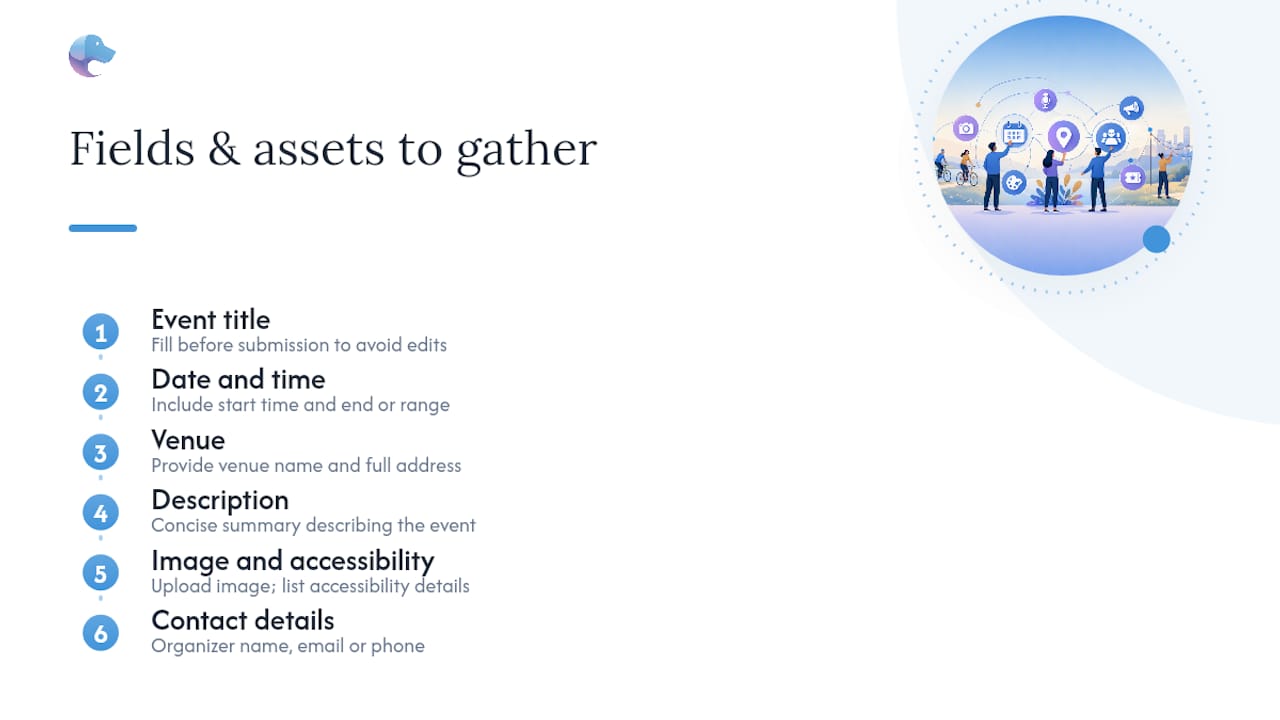
Every field you fill out ahead of time is one less reason your submission bounces back for edits. Municipal calendars from Sacramento to St. Louis ask for a remarkably similar set of fields, which means you can build one master version of your event details and reuse it everywhere.
The full field list
Most public calendars, including the City of Sacramento’s, request:
- Event title
- Start date and time, end date and time
- Category or tags (arts, family, markets, etc.)
- Venue name and full street address
- Target audience (all ages, families, adults 21+, etc.)
- Organizer name and contact email or phone number
- Link to more information or a registration/ticket page
- Price, or a note that the event is free
Sacramento’s guide also recommends submitting your event several weeks ahead, which gives their team time to review it without rushing.
Image specs and accessibility
Photos and graphics are where a surprising number of submissions stall. Bellows Falls Downtown’s guidelines recommend a square image at 1000×1000 pixels, which is a safe bet across most calendar platforms since square crops well into both grid and list layouts. Stick to JPEG or PNG, keep any text on the image large and high contrast (a lot of these images get shrunk to thumbnail size), and never submit a flyer where the only readable text is a phone number in 8-point font.

Alt text is not optional busywork. Write a plain description of what’s in the image, not a repeat of your event title. "A local sees the difference between “Fall Festival” and “Volunteers set up pumpkin displays on Main Street” — the second one actually tells a screen-reader user what the picture shows. Vegas PBS provides specific guidance on captions for exactly this reason.
Writing the description: bad versus better
Here’s a description that gets flagged for a rewrite:
“COMMUNITY CLEANUP EVENT!!! Join us 4 the annual cleanup, BYOB gloves, meet @ HQ, don’t miss out!!!”
And here’s the same event, written the way editorial calendars actually want it:
“Neighbors are invited to the Fifth Street Community Cleanup on Saturday, March 14, from 9:00 a.m. to noon. Volunteers will meet at the community center, 210 Fifth Street, to pick up litter and plant new greenery along the creek trail. Gloves and bags provided; families and first-time volunteers welcome. Free to attend; registration requested at [link].”
Notice what changed: no abbreviations, no all caps, third-person voice, and every basic question (who, what, when, where, cost) answered in two sentences. Bellows Falls recommends keeping descriptions around 200 words, which is roughly this length doubled, giving you room for one more sentence about accessibility or parking.
For forms that only allow a short teaser, a three-line blurb works:
“Fifth Street Community Cleanup — Saturday, March 14, 9 a.m. to noon at the community center. Free, family-friendly, gloves provided. Register at [link].”
A description written for a general audience, without jargon or shorthand, gets featured far more often than a longer one stuffed with insider language. Clarity beats cleverness on every editorial calendar.
Handling tricky venues and virtual events
If your venue isn’t in a dropdown menu, most forms let you type a custom address in a notes or “other” field, so don’t force-fit it into the nearest wrong option. For virtual or hybrid events, submit the registration or streaming link in place of an address, and say clearly in the description that attendance is remote. If your venue has an accessible entrance, ramp, or ASL interpretation available, say so; several public-media calendars specifically ask for that detail.
Pro Tip: Build one landing page for your event that answers parking and transit questions, notes accessibility features, and lists an FAQ. Link to it from every calendar submission. Admins spend less time emailing you for missing details, and that alone speeds up approval.
How Do You Actually Submit an Event to a Calendar?
The mechanics are nearly identical across most public and municipal calendars, whether you’re working with a city government site or a public radio station’s community page. Once you’ve done it once, the second submission takes ten minutes.
- Find the “Add Event” or “Submit an Event” page. It’s usually linked in the footer or under a “Community” tab. St. Louis, for example, routes everyone through its Add Public Event Form.
- Create an account or log in. Most calendars require this so they can contact you about edits and so you can manage your listing later.
- Select a category and audience. Pick the closest match; when in doubt, choose the broader category rather than a hyper-specific one that might get filtered out of general listings.
- Fill in every required field. Use the master details you already prepared: title, dates, venue, contact, registration link, price.
- Upload your image. Confirm it meets the size and format requirements before you upload, so it doesn’t bounce back.
- Submit and save your confirmation. Screenshot or save any reference number you’re given.
Troubleshooting the common snags
- Venue not in the dropdown? Look for a free-text or “other” field, or note the address directly in the description.
- Image rejected? Resize to the calendar’s recommended dimensions first (1000×1000 pixels is a safe default) and re-save as a JPEG or PNG rather than a PDF or HEIC file.
- Need to add co-hosts? Most forms have a secondary organizer or “presented with” field; if not, mention co-hosting partners in the description itself.
- Recurring dates? Look for a “repeat” or “series” option rather than submitting the same event five separate times, which can trigger duplicate-listing flags.
Once you submit, expect an automatic confirmation message, often something like: “Thank you for your submission. Your event is under review and will be published within 2 to 3 business days.” Some calendars, including Sacramento’s, give you a reference number in that message. Keep it. It’s the fastest way to identify your listing if you ever need to email an administrator about it.
Before you close the tab, run through a fast final check:
- Test every link (registration page, more-info link, virtual meeting link)
- Confirm the time zone is correct, especially for virtual events with attendees in different regions
- Double-check the date, particularly the year, since a surprising number of rejected submissions simply have next month’s date typed as this month’s
What Happens After You Submit Your Event?
Submission is not publication. Almost every calendar routes new listings through a human review before they go live, and understanding that gap saves you from panicking when your event doesn’t appear instantly.
Sacramento’s community calendar typically reviews submissions within 2 to 3 business days. Maine Public asks organizers to submit at least 3 to 5 days before the event to leave room for that review. And practitioner guidance on municipal submissions notes that while individual event approvals often clear in 24 to 48 hours, getting set up as a new submitting source in the first place can take 2 to 6 weeks if the calendar requires organizational vetting.
During review, admins commonly edit:
- Titles that run too long for the calendar’s display grid
- Descriptions with unclear language, trimmed or rewritten for plain-language clarity
- Images that need cropping to fit a square or banner format
KOSU’s community calendar is upfront that staff may edit listings for clarity before publishing, which is standard practice, not a sign your submission failed.
If you need to correct or cancel a listing, email the calendar administrator directly rather than resubmitting the whole event. A simple template works:
Subject: Edit request — [Event Name], [Date]
Body: “Hi, I submitted [Event Name] on [submission date], reference number [if provided]. I need to update [specific field] to [correction]. Could you make this change or let me know how to do so? Thanks for your help.”
Once your listing goes live, verify it looks right, share the calendar link on your own social channels, and check whether the calendar offers a featured or sponsored slot for extra visibility.
Why Do Calendar Submissions Get Rejected?
Most rejections trace back to five or six repeatable mistakes, and every single one is fixable in under ten minutes once you know what to look for.
The usual suspects:
- Inconsistent or missing dates — a title says “Saturday” but the date field lands on a Tuesday
- Vague descriptions that never say what the event actually is (“Join us for a great time!” tells an editor nothing)
- Internal jargon or abbreviations that make sense to your organization but nobody else
- Poor image quality or wrong file format — blurry flyers, PDFs where JPEGs are required
- Political or campaign content on calendars built for community and civic use, not electioneering
- Events outside the calendar’s coverage area, submitted anyway on the hope nobody checks
Here’s the difference clarity makes, side by side. Rejected: “BBQ FUNDRAISER 4 THE TEAM, come thru, $$ 4 uniforms!!” Approved: “The Eastside Youth Soccer League is hosting a barbecue fundraiser on Sunday, April 12, from noon to 3 p.m. at Riverside Park, 400 River Road. Proceeds support new uniforms for the spring season. Plates are $10; families welcome. Details at [link].”
Editorial teams consistently favor plain, third-person language over cleverness or shorthand, because their job is to make an event understandable to someone who has never heard of it before.
Fix the tone, fix the format, fix the geography mismatch, and you’ll clear review on the first pass more often than not.
When Should You Submit, and What About Recurring Events?
Lead time is the single easiest variable to control, and it’s the one most first-time submitters underestimate. A quick review window doesn’t help you if you submit the morning of the event.
As a baseline:
- Minimum practical window: about 7 days. This covers most standard review turnarounds without pushing your luck.
- Recommended window: 2 to 3 weeks out. This matches Sacramento’s guidance and gives editors room to request fixes without rushing your listing past deadline.
- New submitting source: budget 2 to 6 weeks. If this is your first time submitting to a particular calendar and it requires account verification or organizational vetting, start early.
For multi-day festivals or ongoing exhibitions, most calendars prefer one listing with a start and end date rather than a separate entry for every single day. Weekly or monthly recurring events (a Tuesday farmers market, a monthly book club) usually have a dedicated “recurring” or “repeat” option in the submission form. Use it instead of manually duplicating entries, which tends to trigger spam filters on some platforms.
If timing gets tight and you’re scrambling to list a last-minute event, prioritize the highest-authority calendar first, your city or public-media site, since that’s the one most likely to surface in search results and local news roundups, and treat smaller or niche calendars as secondary submissions.
Should You List on Discovery Platforms Too?
Municipal and public-media calendars build trust and search authority because they’re the recognized, official record of what’s happening locally. But they also tend to serve one audience at a time: whoever already checks that specific site.
Discovery platforms exist to solve the other half of the problem, reaching people who weren’t already looking at any particular calendar. Eventhound, for example, layers AI-driven location and interest matching on top of standard listings, so an event surfaces for someone nearby based on what they’ve shown interest in before, not just because they happened to browse a city’s events page that day.
A few things worth doing once your event is live on official calendars:
- Prioritize high-authority calendars first, since search engines and AI answer tools tend to pull from municipal and public-media sources before smaller directories.
- Keep one canonical landing page per event rather than scattering slightly different descriptions across five sites; consistency helps both readers and search rankings.
- Match your name, address, and phone number exactly everywhere you post, since inconsistent business details across listings can quietly hurt local search visibility.
Cross-posting consistently, rather than writing a new description for every platform, is also just less work for you as the organizer, which matters when you’re juggling ten other things before an event.
Pro Tip: Offer the calendar something back, a short quote for their newsletter, a reciprocal link from your own event page, or a sponsor blurb. Calendars that accept community contributions sometimes bump reciprocal submissions into featured blocks that standard listings rarely reach.
What’s the One Change That Improves Your Odds Most?
If there’s one habit worth building before anything else, it’s writing your description like a newspaper caption, not a flyer. Answer who, what, when, where, and why in plain third-person language, and skip the exclamation points entirely. Editorial reviewers aren’t grading your enthusiasm. They’re checking whether a stranger could read your two sentences and know exactly what to expect.
The second habit, alt text, gets skipped constantly, and it shouldn’t. A clear, literal description of your event image does double duty: it helps calendars meet accessibility standards, and it often reads as more professional to the human reviewing your submission. Get those two things right and most of the rejection reasons in this guide simply stop applying to you.
How Eventhound Extends Your Event’s Reach
Municipal and public-media calendars are the right first stop for any community calendar submission, and nothing here suggests skipping them. But once your listing is live on the official record, the question becomes how many of the right people actually see it.
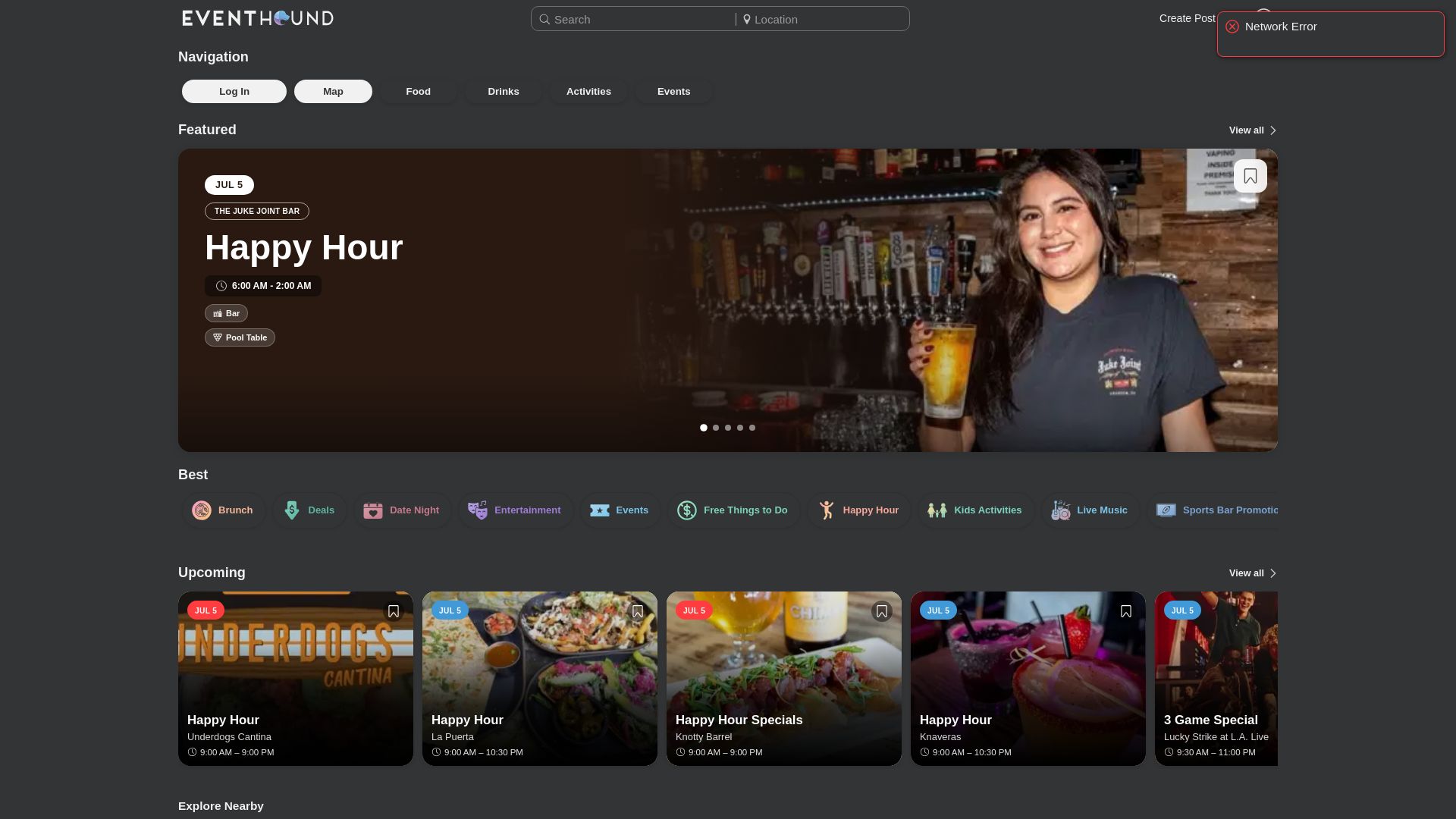
That’s the gap Eventhound is built to close. Rather than waiting for someone to browse a specific city calendar, Eventhound’s AI matches your event to people nearby based on their actual interests, live availability, and location, so your farmers market or gallery opening shows up for someone who’s genuinely likely to attend, not just someone who happened to scroll past it. You can see exactly how the matching and listing process works on the Eventhound how it works page, and if you’re weighing distribution options beyond a single calendar, this rundown on where to list events for free is a useful companion.
Getting started takes a few minutes: create an account, list your event with the same details you already prepared for your calendar submission, and decide whether a featured or sponsored boost makes sense for a bigger event. Organizers who want to review posting standards first can check the business posting guidelines before submitting. Head to Eventhound to list your first event and see it alongside everything else happening nearby.
Frequently Asked Questions
Do I need to create an account to submit an event? Most public and municipal calendars require an account or login, since it lets administrators contact you about edits and lets you manage or cancel your listing later.
How long before my event should I submit it? Two to three weeks is a safe standard, matching guidance from calendars like Sacramento’s. Some public-media calendars accept as little as 3 to 5 days, but a new submitting source may need 2 to 6 weeks for initial account approval.
What image size works across most calendars? A square image at 1000×1000 pixels, saved as a JPEG or PNG, fits comfortably into most calendar layouts without needing an awkward crop.
Why was my event rejected? The most common reasons are vague descriptions, missing or inconsistent dates, low-quality images, jargon-heavy copy, or an event that falls outside the calendar’s geographic or eligibility scope.
Can I submit a virtual or hybrid event? Yes. Most calendars, including public-media sites like Texas Public Radio, accept virtual submissions; just replace the venue address with your registration or streaming link and note in the description that attendance is remote.
How do I edit or cancel a listing after it’s approved? Email the calendar administrator directly with your event name, submission date, and reference number if you have one, and state clearly what needs to change.
Sources
- Community Calendar Submission Guide | City of Sacramento
- Community Event Calendar Submission Guidelines – Bellows Falls Downtown
- Submit A Community Event to the Event Calendar
- Community Calendar Event Submission
- Community Calendar Event Submission
- Community Calendar Submission